Agent View
Centralized terminal dashboard for managing multiple Claude Code background sessions from a single screen.
Agent View
Agent view is a terminal dashboard for managing multiple Claude Code background sessions from one screen. Instead of juggling terminal tabs or tmux grids, agent view groups all sessions by state, shows one-line summaries and PR status, and lets users peek at output, reply to questions, or attach to any session — without losing context.
Status: Research Preview. Requires Claude Code v2.1.139+.
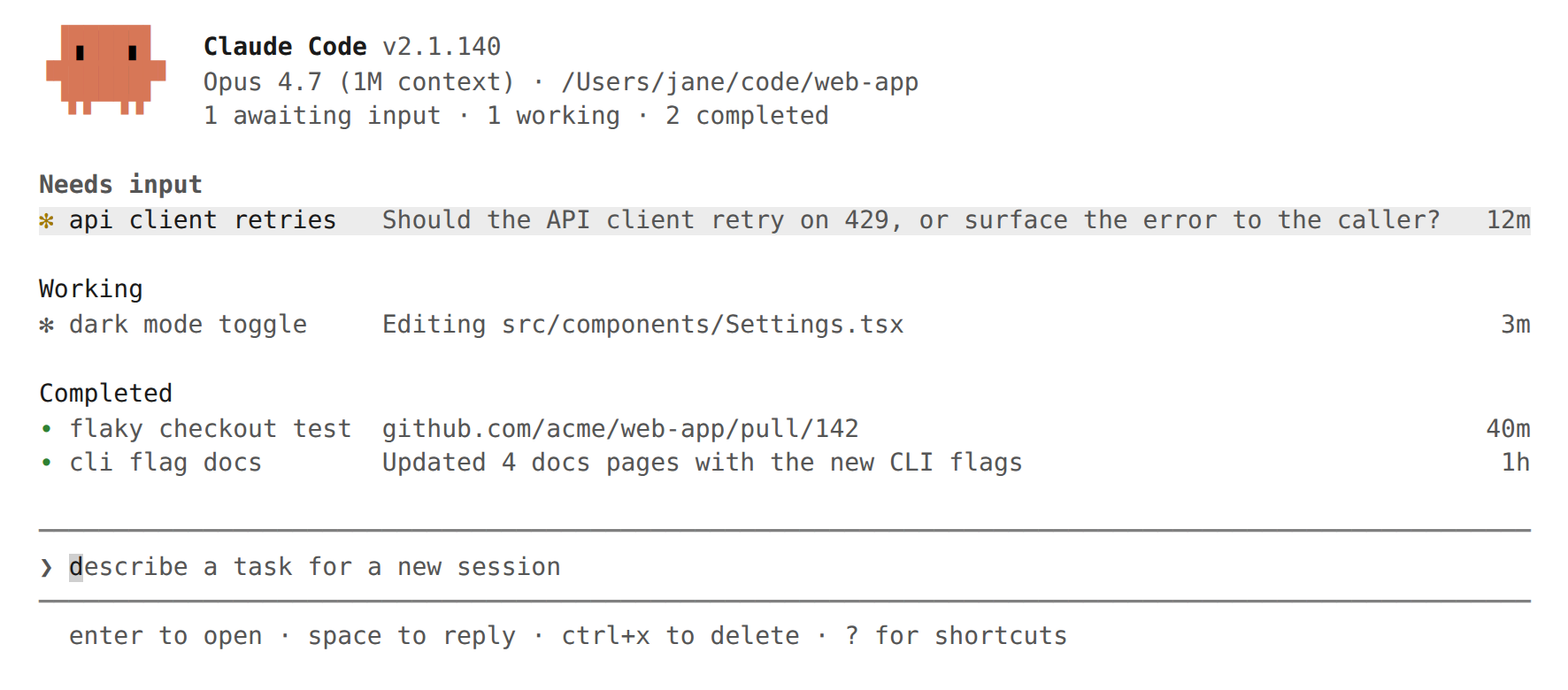
Overview
Agent view replaces the workflow of manually managing parallel Claude Code sessions. It provides:
- Unified session list showing every background session across all projects
- State grouping so sessions needing attention sort to the top
- Peek and reply to answer questions without leaving the dashboard
- PR status indicators visible at a glance on each session row
- Auto-generated summaries describing what each session is doing
- File isolation via automatic git worktrees for safe parallel edits
Agent view complements agent teams and subagents. Agent teams share a task list and communicate directly. Subagents run within a single session and report results. Agent view operates at a higher level — it manages independent background sessions that may or may not be part of a team.
Opening Agent View
There are two ways to open agent view:
| Method | Description |
|---|---|
claude agents | Launch from the shell |
← (left arrow) | Press on an empty prompt in any Claude Code session |
The left-arrow shortcut works from any session — not just ones dispatched from agent view. It backgrounds the current session and opens the dashboard. Disable this shortcut in /config if it conflicts with line editing.
Session States
Each session row shows an icon indicating its current state and process status.
Activity state
| State | Icon | Description |
|---|---|---|
| Working | Animated | Claude is actively running tools or generating a response |
| Needs input | Yellow | Waiting for a user answer or permission decision |
| Idle | Dimmed | Ready for the next prompt |
| Completed | Green | Task finished successfully |
| Failed | Red | Task ended with an error |
| Stopped | Grey | Stopped with Ctrl+X or claude stop |
Process status
| Icon | Meaning |
|---|---|
✻ / ✽ (animated) | Process alive, replies immediately |
∙ | Process exited, restarts on interaction |
✢ | /loop session sleeping (shows run count and countdown) |
Row Display
Auto-generated summaries
Each session row includes a one-line summary generated by a Haiku-class model. Summaries refresh at most once every 15 seconds while a session is working, plus once when a turn ends. Each refresh is one short Haiku request billed under the user's normal provider terms.
PR status
When a session opens a pull request, a status dot appears on the row:
| Dot color | Meaning |
|---|---|
| Yellow | Checks running, checks failed, or waiting on review |
| Green | Checks passed, no blocking review |
| Purple | Merged |
| Grey | Draft or closed |
In terminals that support hyperlinks, the dot links directly to the PR. If a session opens multiple PRs, the row shows a count and the dot color reflects the most urgent status.
Grouping
Toggle grouping mode with Ctrl+S:
- By state (default): Sessions grouped under Needs input, Ready for review, Working, Completed
- By directory: Sessions grouped by working directory
Completed sessions fold into a collapsed … N more row. Sessions with failures or open PRs remain visible.
Interacting with Sessions
Peek and reply
Press Space on any session row to open the peek panel. It shows the most recent output or question — not the full transcript. From the peek panel:
| Action | How |
|---|---|
| Reply to a question | Type an answer and press Enter |
| Select a multiple-choice option | Press the corresponding number key |
| Apply suggested reply | Press Tab |
| Run a shell command | Prefix with ! |
| Peek adjacent sessions | ↑ / ↓ |
| Attach to session | → |
| Close peek | Esc |
Attach and detach
Press Enter or → on a row to attach. Agent view is replaced by the full interactive session. Claude posts a summary of what happened while the user was away.
To detach and return to agent view:
| Method | Behavior |
|---|---|
← on empty prompt | Return to agent view; session keeps running |
Ctrl+Z | Immediate detach |
Ctrl+C, Ctrl+D, /exit | Leave session running in background |
/stop | End the session |
Dispatching Sessions
From agent view
Type a prompt in the bottom input and press Enter. Each prompt starts a new session — it is not a follow-up to an existing one. The session is named automatically from the prompt (rename with Ctrl+R). Images can be pasted into the dispatch input.
Dispatch modifiers:
| Modifier | Effect |
|---|---|
<agent-name> <prompt> | Run a custom subagent as the main agent |
@<agent-name> | Mention a subagent anywhere in the prompt |
@<repo> | Run the session in a specific repository |
/<skill> | Dispatch a skill as a workflow |
#<number> or PR URL | Select the existing session for that PR |
Shift+Enter | Dispatch and immediately attach |
From inside a session
| Command | Effect |
|---|---|
/background or /bg | Move the current session to background |
/bg <prompt> | Give one more instruction before backgrounding |
Running subagents and background commands do not transfer when backgrounding a session.
From the shell
# Dispatch to background
claude --bg "refactor the auth module"

# Dispatch with a specific subagent
claude --agent security-reviewer --bg "audit the login flow"
Both forms print the session ID and management commands after dispatching.
File Isolation
Before editing files, a background session automatically moves to an isolated git worktree under .claude/worktrees/. Parallel sessions read the same checkout but write to their own worktrees, preventing conflicts.
Worktree creation is skipped when:
- The session is already under
.claude/worktrees/ - The working directory is not a git repository
- Writes target a path outside the working directory
In non-git repositories, sessions write directly to the working directory. Avoid parallel edits in this case.
Cleanup: A worktree is removed when its session is deleted. Always commit and push changes before deleting a session that edited files.
Organization and Filtering
Organization shortcuts
| Shortcut | Action |
|---|---|
Ctrl+S | Toggle grouping (state vs directory) |
Ctrl+T | Pin/unpin session (pinned sessions sort to top) |
Shift+↑ / Shift+↓ | Reorder sessions |
Ctrl+R | Rename session |
Enter on group header | Collapse/expand group |
Ctrl+X | Stop session; press again within 2 seconds to delete |
Ctrl+X on group header | Delete all sessions in group (with confirmation) |
Filtering
Type a filter expression in the dispatch input:
| Filter | Matches |
|---|---|
a:<name> | Sessions running a named agent |
s:<state> | Sessions in a given state (e.g., s:working, s:blocked) |
#<number> or PR URL | Session working on that PR |
Keyboard Shortcuts
| Shortcut | Action |
|---|---|
↑ / ↓ | Move between rows |
Enter | Attach to selected session, or dispatch if text in input |
Space | Open/close peek panel |
Shift+Enter | Dispatch and attach immediately |
→ | Attach to selected session |
Alt+1 .. Alt+9 | Attach to session 1–9 in current group |
Tab | Browse subagents (empty input) or apply suggestion |
Ctrl+S | Switch grouping (state vs directory) |
Ctrl+T | Pin/unpin selected session |
Ctrl+R | Rename selected session |
Ctrl+G | Open dispatch prompt in $EDITOR |
Ctrl+X | Stop session; press twice to delete |
Shift+↑ / Shift+↓ | Reorder selected session |
Esc | Close peek panel, clear input, or exit |
Ctrl+C | Clear input; press twice to exit |
? | Show all shortcuts |
Shell Management Commands
Manage sessions from the shell without opening agent view:
| Command | Description |
|---|---|
claude agents | Open agent view |
claude attach <id> | Attach to a session in the terminal |
claude logs <id> | Print recent output |
claude stop <id> | Stop a session (alias: claude kill) |
claude respawn <id> | Restart a stopped session with conversation intact |
claude respawn --all | Restart all stopped sessions |
claude rm <id> | Remove session from list and clean up worktree |
Background Session Architecture
Supervisor process
A per-user daemon hosts all background sessions. It starts automatically on first use of agent view or any background dispatch.
| Aspect | Detail |
|---|---|
| Authentication | Uses the same credentials as interactive sessions |
| Process model | Each background session is a separate Claude Code process |
| Idle cleanup | Stops a session process after ~1 hour idle and unattached |
| State persistence | Transcript and state on disk; a fresh process resumes on next interaction |
| Auto-update | Watches the binary, restarts after the auto-updater replaces it |
| Session survival | Background sessions keep running through supervisor restarts |
Storage locations
| Path | Contents |
|---|---|
~/.claude/daemon.log | Supervisor log |
~/.claude/daemon/roster.json | Running sessions list (reconnects after restart) |
~/.claude/jobs/<id>/state.json | Per-session state for agent view |
Override the base path with the CLAUDE_CONFIG_DIR environment variable.
Configuration
Model
The agent view header shows the default model used for new dispatches. Override per session:
--modelflag withclaude --bg/modelcommand after attachingmodelfield in subagent frontmatter
Permissions
Background sessions read their permission mode from the target directory's settings or the dispatched subagent's frontmatter. The defaultMode from settings applies when no mode is specified. bypassPermissions and auto require prior interactive acceptance.
Disabling agent view
| Method | Setting |
|---|---|
| Settings file | disableAgentView: true |
| Environment variable | CLAUDE_CODE_DISABLE_AGENT_VIEW=1 |
| Managed settings | Enforced by admin |
Use Cases
Scaling concurrent work
Dispatch several tasks at once — optionally with skills or custom agents — then return to a list of PRs ready for review:
@backend add rate limiting to the /api/upload endpoint
@frontend update the file upload component to show progress
@tests add integration tests for the upload flow
Long-running agents
PR babysitters, dashboard updaters, and /loop jobs show their next run time in the session list. Sessions with the ✢ icon display a countdown to the next iteration.
Quick context switching
Press ← mid-session to open agent view, start a related task or answer a quick question, then → back to the original session. Peek shows the answer as soon as it lands.
PR tracking dashboard
Scan the PR status dots and peek at titles to see which sessions have produced pull requests, which are waiting on CI, and which have been merged.
Comparison with Other Parallel Patterns
| Pattern | Coordination | Isolation | Best for |
|---|---|---|---|
| Agent view | None (independent sessions) | Auto-worktree per session | Scaling parallel tasks, background dispatch |
| Agent teams | Shared task list + messaging | Shared working directory | Cross-cutting work needing collaboration |
| Subagents | Report back to parent only | Parent's context | Focused single tasks within a session |
| Worktrees | Manual | Manual git worktree add | Long-lived feature branches |
Troubleshooting
claude agents lists subagents instead of opening agent view
Agent view is unavailable in the current environment or version. Run claude update and verify the feature is not disabled via settings or environment variable.
Agent view opens with no sessions
This is expected on first use. Type a prompt in the bottom input to dispatch the first session.
"Cannot open agents — N background task(s) running"
The current session has in-flight subagents, workflows, or background commands. The ← shortcut will not abandon them. Run /tasks to see what is running, then /bg to confirm abandoning.
Prompt rejected as too short
The dispatch input expects a task description of 4+ characters to prevent accidental dispatch from stray keystrokes.
Sessions show failed after waking machine
Background sessions do not survive sleep or shutdown. Attach, peek, or reply to restart, or run claude respawn --all.
Session slow to respond after attaching
The supervisor stopped the process after ~1 hour idle and unattached. A fresh process starts from where it left off. Sessions that were actively working or waiting for input are never stopped this way.
.claude/worktrees/ filling up
Worktrees are removed when their session is deleted. If a session ended without cleanup:
git worktree list
git worktree remove <path>
Known Limitations
- Rate limits: Each background session consumes subscription quota independently. Running 10 parallel agents uses 10x the quota.
- Local only: Sessions run on the user's machine and stop on sleep or shutdown.
- Worktree cleanup: Changes must be committed and pushed before deleting a session that edited files.
- Research preview: Keyboard shortcuts and UI may change during the preview period.
Availability
| Requirement | Value |
|---|---|
| Plans | Pro, Max, Team, Enterprise, Claude API |
| Minimum version | v2.1.139 (May 11, 2026) |
| Status | Research Preview |
Sources
- Manage multiple agents with agent view — official documentation
- Agent view in Claude Code — announcement blog post (May 11, 2026)
- v2.1.139 changelog — release notes
- Run agents in parallel — comparison of parallel execution patterns
- Agent teams — related feature for coordinated multi-agent work
- Create custom subagents — related feature for delegated tasks
- Worktrees — manual worktree isolation